
The NEX cluster — user guide
By Roberto Arato of aratoingegneria.it
This guide is for people who work on the cluster: access, files, programs. For installation and administration see installazione.md; for all the details of the shell see nexsh.md.
What only NEX does. A program started on another node shows its window on your desktop (X11 and Wayland) and plays its sound on your speakers (PulseAudio and PipeWire), with no
ssh -Xand no remote desktop (section 5). The devices of every node are shared: serial ports, instruments and boards in/devnodes/NODE/dev/NAME, local sockets, disks (NBD) and USB peripherals (USB/IP), together with the cluster portsnex:PORT(section 8). The processes of all the nodes are one table (nex ps,nex kill NODE:PID) and the clipboard is shared between your NEX desktops.
Contents
- A cluster like a single computer
- Logging in
- Your files
- Working: nexsh
- Graphical programs and audio
- Long and parallel jobs
- Watching the cluster
- Passwords and keys
- When something goes wrong
- Good habits
- In short
1. A cluster like a single computer
The cluster is made of several computers (the nodes), but for you it behaves almost like a single one:
- your files are the same on every node: the
/nexfolder is shared, what you write from one node you can read right away from another; - your user is the same everywhere: same name, same password, same home;
- you choose where a program runs, or you let NEX choose: the least loaded node.
Some nodes only act as storage and do not run programs: you see them in the
list of nodes with COMPUTE no.
2. Logging in
Log in with ssh on any compute node, with your cluster user:
ssh mario@node-a
You land in your home, /nex/home/mario, the same on every node. To work
with the cluster features start nexsh:
nexsh
[nex node-a /nex/home/mario]$
The prompt always tells you which node you are on and in which folder.
If a node is under maintenance (detached from the cluster) the login is
refused: log in from another node. With ssh the message may be the generic
Permission denied; from the console or with su you read the reason.
3. Your files
| Folder | What | Seen from |
|---|---|---|
/nex/home/mario |
your home | all nodes |
/nex/data, /nex/... |
shared data and projects (according to permissions) | all nodes |
/tmp, /var/tmp |
temporary files | only the node where you write them |
Simple rule: work inside /nex. There a program can run on any node
and find its files. Outside /nex files exist on one node only, and nexsh
reminds you in the prompt (local).
You see the free space of /nex with nxdf (chapter 7). The data in
/nex is kept in several copies on different nodes: a node that fails does
not lose files.
Recovering a deleted or changed file: nex snapshot
Multiple copies protect against failures, not against mistakes: a deleted file is deleted in all copies. That is why every hour the cluster takes a snapshot of your home and of the project folders, that is a read-only picture. Snapshots are kept for the last 24 hours, one a day for 14 days and one a week for 8 weeks.
nex snapshot                      # the snapshots of the folder you are in
nex snapshot relazione.odt        # which snapshots contain the file, with size and date
nex snapshot restore relazione.odt
restore takes the most recent snapshot that contains the file. If the
file still exists it does not touch it: it puts the copy next to it, as
relazione.odt.restored-nex-20261006-1800, so you can compare and choose.
With --overwrite it replaces the current file, with --from NAME it uses
a specific snapshot. It also works for whole folders.
Before a risky job (a cleanup, a script that changes many files) take a snapshot of your own, which does not expire by itself:
nex snapshot create --name prima-della-pulizia
nex snapshot remove man-20261006-1852-prima-della-pulizia   # when no longer needed
You can keep 10 per folder. You also find the snapshots as normal folders
in ~/.snap/ (read-only): you can open them with any program and copy what
you need. In the project folders the manual snapshots are taken by the
administrator; you can do the restore yourself, if you have permissions on
the file.
4. Working: nexsh
nexsh is a normal bash with the cluster added: everything you can do in bash works the same.
Run on a specific node:
on node-b ./calcolo dati.txt
on node-b make -j4
Run on the least loaded node:
on any ./calcolo dati.txt
[nex: node-b]
...
Move to another node (like cd, but for nodes):
cn node-b              # from here on everything runs on node-b
cn                     # back to the starting node
cn any                 # go to the least loaded node
Automatic commands: some commands (make, gcc, cmake, …) go by
themselves to the least loaded node when you work in /nex; the line
[nex: node-b] tells you where they went. nexsh auto off keeps them all
local.
Ctrl-C, Ctrl-Z, jobs, fg, bg, wait work as usual, also for
programs running on other nodes.
All the details and examples: nexsh.md.
5. Graphical programs and audio
The whole GNOME desktop with NEX, step by step and with pictures (indicator, search, Nautilus, terminal, notifications, NEX Monitor), is in the guide The GNOME desktop with NEX.
If you work from a desktop, graphical programs started on another node open their window on your screen:
on node-b gimp foto.png
on any blender scena.blend
The program uses CPU and memory of the remote node, the window stays with
you. It also works in cn sessions. No other user can use your screen.
Audio
In the same way, programs started on another node play through your
speakers and record from your microphone: with on and cn it happens
by itself if your desktop has audio (PipeWire or PulseAudio), with
nex run you need -A:
on node-b vlc concerto.mp3
nex run -A --node node-b -- audacity
It applies to programs that use PulseAudio, that is almost all of them
(also with PipeWire, which offers it with pipewire-pulse); programs that
use only the native PipeWire interface are not covered for now. The
connection is yours only: no other user can play or listen through it.
NEXSH_AUDIO=0 turns it off in nexsh.
From the GNOME desktop
With the nex-desktop package (installed by the administrator) the cluster
enters the desktop, by itself at every login:
in Nautilus, in the left sidebar, there is NEX Cluster (
/nex);right click on a file in
/nex→ Script › NEX:- «Run on the least loaded node» or «Run on node-b»: a program runs there, a document opens there with its program, the window comes to you;
- «Open terminal on node-b»;
nex-desktop launcher gimpadds «GIMP (NEX cluster)» to the applications, which starts on the least loaded node;desktop notifications tell you about messages (
nex msg), finished detached jobs and cluster alarms;among the applications there is NEX Terminal (nexsh);
the overview search finds the nodes and your processes on all nodes;
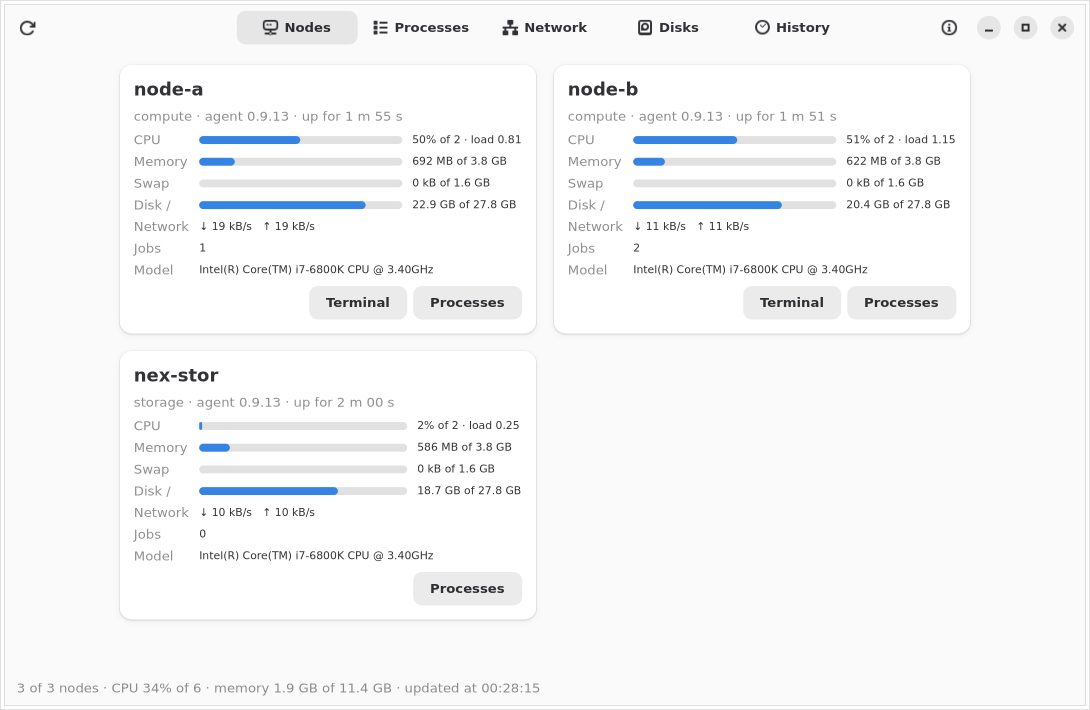
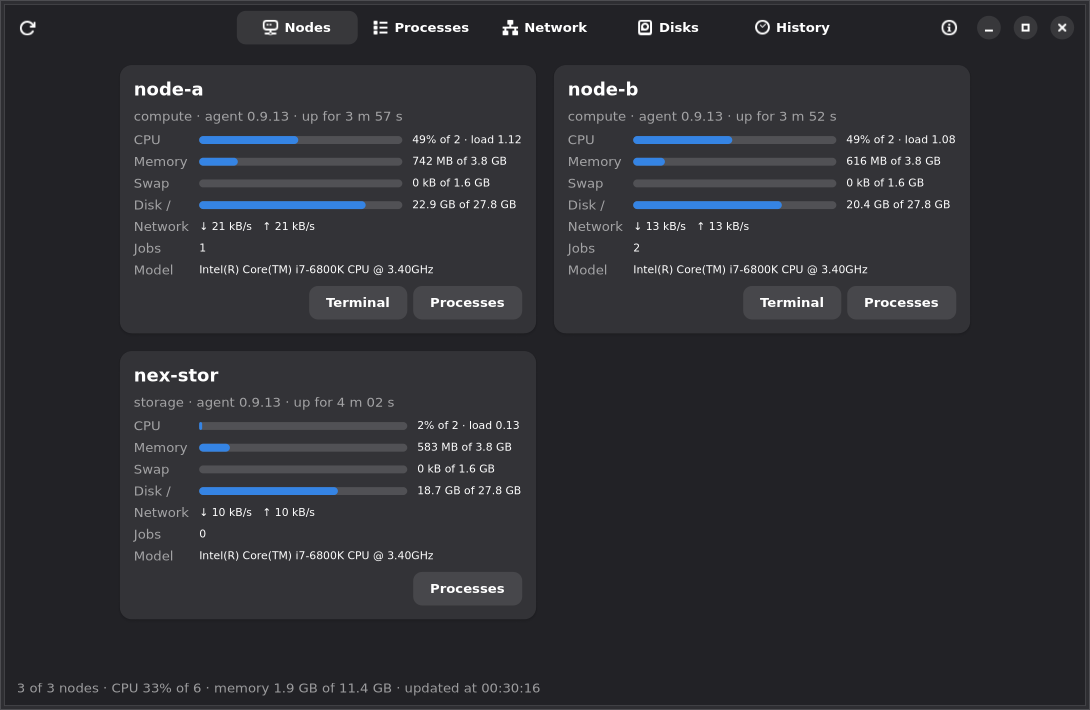
NEX Monitor (among the applications, or
nex-monitor) is the «System Monitor» of the whole cluster:- one tab per node with CPU, memory, disks and network;
- your processes on all nodes, with search and sorting; you select a process and «Send signal» terminates it, after a confirmation, on whatever node it is;
- network interfaces and disk space;
in the top bar an icon shows the live nodes ("3/3"; "2/3 !" if one does not answer) and, in the menu, load and memory of each node, the space of
/nexand the alarms. It is enabled once:gnome-extensions enable nex@aratoingegneria.itshared clipboard between your NEX desktops: copy on one computer and paste on another. It is off until you turn it on:
nex-desktop clipboard on # off to turn it off, status to checkThe copied text only reaches your other desktops and is not stored in the cluster.
6. Long and parallel jobs
Several jobs together, each on the least loaded node:
cd /nex/progetto
for f in dati/*.csv; do
  on any -n ./elabora "$f" > "risultati/$(basename "$f").txt" &
done
wait
Resource limits for a job:
on any --cpu 200 --mem 8G ./simulazione # at most 2 CPUs and 8 GB
Two things to know:
- a job started with
onstops if you close the session (as with ssh). For jobs lasting hours use the detached jobs below; - if the node running the job fails, you get
job LOSTwithin about 25 seconds: the outcome is unknown, check the output files before running it again.
Detached jobs: start, close, come back
nex run -d starts a job that keeps running even if you log out and
answers immediately with its name node:job:
cd /nex/progetto
nex run -d --node any -- ./simulazione --anni 30      # prints e.g. node-b:4f2a91
nex jobs                                              # your detached jobs, on all nodes
nex attach node-b:4f2a91                              # see the output again and follow it live
nex attachfirst shows the last stored output (up to 1 MiB), then the new output. Ctrl-C (or closing the terminal) detaches you: the job keeps running. If the job has already finished you get output and exit code, and the job disappears from the list.- For interactive programs (a shell,
top, an editor) add-t: the job has its own terminal; withnex attachyou pick it up exactly where it was and Ctrl-] detaches you again. - When a detached job finishes you get a notice on all your open
terminals in the cluster ("nex: job node-b:4f2a91 finished with code 0");
nex run -d -qdoes not send it. nex stop node-b:4f2a91stops it. The node name can be omitted (nex attach 4f2a91): NEX looks it up.- A detached job also survives a restart of the node's NEX program; it does not survive the node itself being shut down.
The queue: many jobs, when there is room
With many jobs (a hundred simulations, one per file) you do not need to
choose the node or wait: nex submit queues them and the cluster
starts them as soon as a node has a free CPU (--cpu 200 = the job
reserves two).
cd /nex/progetto
for f in dati/*.csv; do nex submit -q -- ./elabora "$f"; done
nex queue                      # waiting (position), running (node:job), finished
nex submit -p 9 -- ./urgente   # priority from 0 to 9 (default 5): 9 goes first
nex cancel q3fa21b             # removes an entry still waiting
Every queued job, when it starts, is a detached job: nex queue shows
node:job and with nex attach node:job you read its output even after
the job has finished.
Shared programs: module load
The software installed by the administrator in /nex/opt is the same on
all nodes. You activate it with modules:
$ module avail                 # what is there
---------------- /nex/opt/modulefiles ----------------
   gromacs/2025.1    paraview/5.13
$ module load gromacs          # the latest version; gromacs/2025.1 to choose it
$ gmx --version
$ module list                  # what you have loaded
$ module unload gromacs        # and you remove it
- On another node it works the same: after
module load,on node-b gmx ...,nex run,nex submitandcncarry the loaded modules with them, so the program finds its libraries there too. - For good: put
module load gromacsin your~/.bashrc. - Installing it yourself: if the administrator has put you in the
software group (
nexctl software init --group ...), you install in/nex/opt/NAME/VERSIONand create the module withnexctl software add NAME/VERSION --prefix /nex/opt/NAME/VERSION.
Compiling with the CPUs of all nodes: nex make
A C or C++ program with many files compiles faster if several nodes compile
the files together. With the sources on /nex just put nex in front of
make (or ninja):
cd /nex/progetti/simulatore
nex make                 # like make, with -j = CPUs of all compute nodes
nex make -v install      # -v: who compiles and how many compilations each node did
nex ninja                # same thing for projects with build.ninja (CMake, Meson)
nex make --ccache        # plus ccache: what you have already compiled is not recompiled
nex make --local         # everything on this node, to compare the times
- What goes to the other nodes: only the compilations (
cc -c,g++ -c, …) with sources and objects on/nex. The final link, the preprocessor and the commands that use files in/tmprun on your node. - How:
nex makeopens one worker per compute node (only one per node, not one per file) and hands it files as it has free slots. A node with more CPUs takes more. - Compiler errors and warnings arrive as usual, with file and line;
makestops and exits with its code. - If a node goes down during the compilation, the files it was
compiling are recompiled by your node:
makefinishes anyway. - The Makefile does not need to change, as long as it calls the
compiler by name (
cc,gcc,g++,c++,clang,clang++, that is$(CC)and$(CXX)like almost all of them). A fixed path like/usr/bin/gcccompiles only on your node. With CMake: configure withnex makeornex ninjain front, so CMake finds the NEX compilers. - The same compilers on all nodes: the cluster is made of identical nodes, but if you install a compiler or a development library it must be installed on all compute nodes.
The gain grows with the number of nodes and with the weight of the files: the
more time a file takes to compile, the more it pays to send it to another
node. With --ccache, from the second time only what has changed is
recompiled.
ccache with nex make --ccache:
- Where it runs: ccache runs on your node and looks in your cache (the
usual one:
CCACHE_DIR, or~/.cache/ccache, which with the home on/nexis the same from every node). Only what it does not find goes to the other nodes. - What you need: ccache installed on the node from which you run
nex make.
Jobs at fixed times: nex cron
A job to repeat at fixed times (a backup every night, a report every
Monday) is scheduled with nex cron. It starts only once in the whole
cluster, on a live node with free CPU, even if the node where you defined
it is off:
cd /nex/progetto
nex cron add backup '30 2 * * *' -- ./backup.sh        # every night at 2:30
nex cron add report '0 8 * * 1' -- ./report.sh --mail  # on Monday at 8
nex cron add pulizia @daily -- find tmp -mtime +7 -delete
nex cron list                  # next and last run
nex cron run backup            # right now, out of schedule
nex cron remove pulizia
- Schedule: five fields as in
crontab, that is minute, hour, day of the month, month and day of the week (0 or 7 is Sunday), with*, lists1,15, ranges1-5and steps*/15. Alternatively@hourly,@daily,@weekly,@monthlyor@yearly. The nodes' local time applies. - Where it runs: the command starts in the folder where you defined it,
which must be in
/nex. Every run is a queue job: you see it withnex queueand read its output withnex attach node:job. - No overlaps: if the previous run has not finished yet, the new one is
skipped and
nex cron listcounts it. - Cluster down at the scheduled time: when it comes back the job starts once, not as many times as it missed.
Programs that must stay up: services
A web server, an API, a daemon that must always run are defined as a
service. Write a JSON file with command, folder and number of copies, then
use nex service apply. The cluster keeps the copies running on different
nodes, restarts them if they fall and moves them if a node shuts down or
goes into maintenance.
nex service apply sito.json    # create or update (update one instance at a time)
nex service list               # instances, nodes, state
nex service endpoints sito     # node:port of the healthy copies
Everything else is in the services manual: servizi.md.
A fixed environment: --image
A program that wants libraries or versions different from those of the nodes (an old compiler, a specific Python, software distributed as a Docker image) can run in a container:
nex image list                                    # the cluster's images
nex run --image debian:13 -- ./calcola dati.txt
nex run -d --node any --image docker.io/library/python:3.12 -- python3 simula.py
nex submit --image debian:13 -- ./caso.sh 7
nex cron add notte '0 2 * * *' --image debian:13 -- ./backup-dati.sh
- As inside a normal
nex run. It is you (the same user, the files you create are yours), the current folder and all of/nexare the same, the network is the node's.--cpu,--mem, Ctrl-C andnex stopalso apply, and the exit code is the program's. - Only the operating system and the installed programs change, which
come from the image. The
PATHis the image's. - Images are pulled by the administrator (
nex image pull), only once for the whole cluster, from the allowed registries. If an image is not there, ask for it. - In services just add
"image": "debian:13"to the definition. - Graphics and audio: not available in containers (
-X,-Wand-Aare not used with--image).
Your files from a Windows PC
Your home opens from Windows as a network folder (\\smb.nex\YOURNAME or
the address the administrator gives you), with the cluster user and
password. The first time you need a nex passwd: even the same password is
fine. Step by step in smb.md.
One thing at a time across the cluster: nex lock
When two jobs must never run together, even if they start from different nodes (a backup, an update of a shared file), put the command under a cluster lock:
nex lock backup -- ./backup.sh              # waits for its turn, then runs
nex lock --nowait backup -- ./backup.sh     # busy: exits at once with code 75
nex lock list                               # who holds what
The lock is released by itself when the command finishes. If the node loses contact with the cluster, the command is stopped before the lock passes to someone else. Details in chapter 10 of servizi.md.
Values shared between programs: nex kv
Small text values (up to 64 KiB) that every program reads identically from any node, with no files to lock:
nex kv set progetto/stato "fase 2"           # writes
nex kv get progetto/stato                    # reads (code 1 if missing)
nex kv set prova/temporanea x --ttl 10m      # disappears by itself after 10 minutes
nex kv list progetto/                        # keys starting like this
nex kv del progetto/stato
echo "$CONFIG" | nex kv set progetto/config -  # value from stdin
By default the values are yours only. With --group NAME you share
them with the members of a group. With --cluster everyone reads them, but
only root writes them.
Atomic compare works across different nodes too:
--if-absentwrites only if the key does not exist;--expect OLDwrites only if the key still has that value.
If someone else got there first, the command exits with code 3. For example, among many copies of the same script started on different nodes, only the first one does the work:
nex kv set lavori/notte "$(hostname)" --if-absent --ttl 12h && ./elabora_notte
From C programs the same thing is in libnex (chapter 13 of libnex.md).
Passwords and tokens for programs: nex secret
A database password or a service token, to use in a script on any node, without keeping them in a file:
nex secret set db/produzione                 # asks for the value twice, without echo
openssl rand -hex 32 | nex secret set api/chiave   # or from stdin
PW=$(nex secret get db/produzione)           # in a script, on any node
nex secret list                              # the names, never the values
nex secret rm db/produzione
- Who sees them: secrets are yours only; not even another user
reads them with
nex. - How they are stored: encrypted with the cluster key. The cluster's store holds only the ciphertext, and the audit log records the name, never the value.
- Never on the command line: the value is typed at the terminal or
comes from stdin, because as an argument anyone could see it with
ps.
Messages between programs: nex pub, nex sub, nex mq
To all subscribers: a program publishes, and every subscribed process receives the message, on whatever node it is:
nex sub simulazione/avanzamento              # one line per message, until you stop it
nex sub simulazione/avanzamento --history 10 # first the last 10 already published
nex pub simulazione/avanzamento "passo 120 di 500"   # from another node
nex pub says how many subscribers received the message. The history
keeps the last 100 messages for those who arrive later.
Only one: a work queue. Each queued message is taken by only one consumer, even if there are many on different nodes:
for f in dati/*.csv; do nex mq push lavori "$f"; done        # the distributor
while f=$(nex mq pop lavori --wait 30); do ./elabora "$f"; done   # each consumer
nex mq len lavori                                             # how many are left
The spaces are those of nex kv: personal (default), --group NAME or
--cluster, where only root writes.
nex jobs
JOB             STATE             AGE TTY  COMMAND
node-b:4f2a91   running         2h05m no   ./simulazione --anni 30
node-a:9c03e7   finished 0      0m40s yes  bash
7. Watching the cluster
| Command | What it shows |
|---|---|
nodes |
the nodes: reachable, compute, load, free memory |
nxtop |
like top, but for the whole cluster (q to quit) |
nxps |
your processes on all nodes |
nxfree |
the memory of each node and of the cluster |
nxcpu |
the processors of each node and how busy they are |
nxnet |
the networks of each node and the traffic |
nxss |
your connections and open ports on all nodes |
nxdf |
the space of /nex and of the nodes' disks |
nex kill node-b:PID |
stops one of your processes on any node (nxtop: key k) |
nex wait node-b:PID |
waits for one of your processes to finish |
nex msg USER text |
message to a user's terminals on all nodes |
nex logs |
the logs of your programs on all nodes, in time order (-f follows, -g text searches, --job node:job a detached job) |
Example:
$ nodes
NODE         STATE        COMPUTE MOUNT     LOAD  CPU   MEM FREE JOBS      MS
node-a       ok           yes     nexfs     0.22    2       6.7G    0     0.0
node-b       ok           yes     nexfs     0.15    2       6.8G    0     8.7
nex-stor     ok           no      -         0.00    2       3.1G    0     7.0
What the cluster was like yesterday: nex history
The commands above tell you what the cluster is like now. To know what it was like last night, or last week, there is the history of the measurements: every node, once a minute, saves CPU, load, memory, network traffic and disk space, and the cluster keeps them for 30 days.
$ nex history --since 30m --node node-b --what cpu,mem,net,load
from 2026-10-09 09:29:00 to 2026-10-09 09:59:00, one point every 1 min; CPU and memory in %, network in bytes/s
node-b     CPU                ▁▄▃▁▁▂▁▁▁ ▁▁▆▁▁▂▁▁  min 8 avg 17 max 63
           load               ▇▃█▆▇▄▂▂▂ ▁▁▂▁▄▂▂▂  min 0.3 avg 0.7 max 1.6
           mem                ▃▃▃▃▃▃▃▃▃ ▃▃▃▃▃▃▃▃  min 27 avg 27 max 27
           net ↓              ▄█▅▄▄▄▅▄▄ ▃▅▄▄▃▃▃▃  min 33k avg 45k max 97k
           net ↑              █████████ ▇█▇█████  min 60k avg 64k max 69k
--since: how far back to go:30m,6h(if omitted),2d, up to30d. The line is as wide as the terminal: each block is the average of the samples of that stretch of time.--node: a single node; without it, all of them.--what: what to show, amongcpu,mem,net,load,disk(space of/) andstorage(the NEXFS storage of the cluster: space used, reads, writes, blocks with missing copies); if omitted,cpu,mem,net.--json: the numbers, for scripts.- A gap in the line (as above, in the middle) means that in that minute the node recorded nothing: it was off or the agent was restarting.
The same history, with real charts, is in the History page of
NEX Monitor and, for scripts, in GET /api/v1/metrics (api.md).
Alarms: nex alarm
The cluster checks itself every 30 seconds: nodes that do not answer, disks
and /nex nearly full, memory exhausted, storage (NEXFS) problems. When
something crosses a threshold an alarm is raised: it appears at the top
of the dashboard, in the nex alarm command and, for the administrator, as
a message on the terminal (and optionally by email).
$ nex alarm
LEVEL    ALARM                        SINCE           MESSAGE
WARNING  nexfs                        10-06 18:31:02  shared filesystem /nex at 87% (thresholds 85% warning, 95% critical)
WARNING means "look at it soon", CRITICAL "look at
it now". An alarm clears by itself when the problem goes away (for space:
when it drops 5 points below the threshold). If you see /nex nearly full,
free some space or tell the administrator. nex alarm exits with 0 if
there are no alarms, 3 with warnings only, 4 with at least one critical:
handy in a script.
How much you used and what you started: nex acct, nex audit
$ nex acct
period 2026-10-01 - 2026-10-08
USER               CPU JOBS CPU SESSIONS     JOBS     MEM MAX       SPACE
mario               3:12:40      0:41:05      128      3.2 GB     41.7 GB
nex acct tells you how much of the cluster you used in the period
(default: since the first of the month, --from and --to for other
dates):
- CPU JOBS: processor hours of your jobs;
- CPU SESSIONS: processor hours of what you do while logged in;
- JOBS: how many you started;
- MEM MAX (maximum memory): the peak reached;
- SPACE: how much your home and the folders you own take up.
nex audit shows the log of what you did: every job with node, command,
folder, exit code, duration, CPU and memory, plus the actions on your
services, tasks, snapshots and tokens. The last 24 hours by default,
otherwise --since 3d, --since 2026-10-01 or --type job.end.
Everyone sees only their own data; the administrator sees everyone's.
Scripts and programs: the API and the library
To use the cluster from a script or a program there are two ways:
- from outside or in any language, the HTTP/JSON API. Create a token
with
nex token create NAME; the secret is shown only once, so save it in a file of yours. Then callhttps://node-a:7443/api/v1/...withAuthorization: Bearer. The token has your permissions and expires (90 days by default);nex token revoke NAMEcancels it at once. Guide: api.md; - in C, on a node, the
libnexlibrary:nex_spawnandnex_waitstart and wait for processes across the whole cluster. Guide with examples: libnex.md.
The dashboard in the browser
Every node serves a read-only dashboard: open https://node-a:7443 (or another node, the data covers the whole cluster) and log in with your cluster user and password. Tabs:
- Overview: reachable nodes, free CPU and memory, shared
filesystem, NEXFS status; one box per node with CPU, memory,
/nexand disk; - Nodes, Processes (filter, sort by column),
Jobs (detached and queue), Storage (NEXFS health, data
nodes, disks), Devices (
/devnodes), Logs; at the top of every tab, the active alarms.
You see what you see with nex ps, nex jobs, nex logs: your processes
and your jobs. It refreshes every 5 seconds; after 30 minutes without use
it asks for the password again. The first time the browser must know the
cluster CA (ask the administrator for it) and the node name must be
resolvable: the IP address alone is not enough.
Step-by-step instructions, with screenshots: dashboard.md.
Your quotas
The administrator can give you limits: the space of your home and, on each node, how much CPU and memory your jobs can use together. You see them with:
$ nex quota
space in /nex/home/mario: 12.4G used of 50.0G (25%)
CPU per node: 400% (4.0 CPUs)
memory per node: 16.0G
Beyond the space, writes fail with "Disk quota exceeded"; a job that exceeds the memory is stopped (code 137); beyond the CPU, jobs slow down.
8. Passwords and keys
Change the password (applies on all nodes):
nex passwd
In nexsh passwd is enough. The command asks for the current password and
twice for the new one (at least 8 characters). It applies at once on the
node you are on, on the others within a minute.
ssh keys: your home is shared, so a key added to
~/.ssh/authorized_keys applies on all nodes. Alternatively the
administrator adds it.
Reaching a service on another node: nex forward
A program on node-b offers a web page or a database only on localhost
(for example a Jupyter notebook). From where you are:
nex forward --node node-b 8888:localhost:8888
# now http://127.0.0.1:8888 on your node leads to node-b's service
Like ssh -L: the local port (here 8888) leads to localhost:8888 as
seen from node-b. It stays active until you press Ctrl-C. You reach only
what you would reach by starting a program on that node.
The opposite direction, like ssh -R: a service of this node offered on
another one.
nex forward -R --node node-b 8888:localhost:8888
# now http://127.0.0.1:8888 on node-b leads to this node's service
The port opens on node-b (as you, like with nex run) and every
connection comes back here. Ctrl-C closes it on node-b too.
Cluster ports: nex:PORT
On every node the names nex and cluster are the common address of the
cluster (127.77.0.1). A program listening on nex:PORT, on any node, is
reached with the same address from all nodes, without nex forward:
# on node-b
python3 -m http.server 8800 --bind nex
# on any node
curl http://nex:8800/
localhost stays with the single machine: whoever listens there stays
private to its node. A port of nex is one in the whole cluster: opening it
on another node gives "address already in use", as on a single machine.
When the program closes the port, or its node stops, the port is free again
everywhere within a few seconds; if it starts again on another node, the
connections follow it (for about a second the port still belongs to the
cluster: opening it at once on another node can give "already in use").
Ports below 1024 can be opened only by root. The same holds for UDP
(nex:PORT/udp: every datagram arrives whole, every client gets its own
replies). nex ss --cluster lists them all, with the node that holds them
and the user.
Who may connect. By default every user of the nodes may connect to a
cluster port, as to a port on localhost. Whoever listens on the port (or
root) can restrict it:
nex port allow 8800 --users anna,luca --groups project   # only them (and you, and root)
nex port rules                                            # the rules
nex port clear 8800                                       # open to everyone again
The rule applies on every node within a few seconds, also to the programs on the same node as the service (there the kernel applies it, with nftables). Whoever is not allowed finds the connection refused. The rule is yours as long as the port is yours: if the port passes to another user, your rule no longer counts.
IPv6. Cluster ports also have an IPv6 address, fd6e:6578::1, with the
names nex6 and cluster6 (nex and cluster stay IPv4). A program can
listen there (--bind nex6; a program listening on [::] does not count,
it must be that address) and the port stays one in the whole cluster:
clients arrive with nex or with nex6, from any node, also from the node
of the service.
Using a device of another node: /devnodes
A serial port (a USB adapter, an instrument, a board) is connected to node-b, but you work on node-a. If the administrator has exported it, you see it on every node as a local device:
nex devices                                  # what is exported and whether you can use it
stty -F /devnodes/node-b/dev/ttyUSB0 115200 raw -echo
picocom -b 115200 /devnodes/node-b/dev/ttyUSB0
- it works with any serial program (picocom, minicom, screen, pyserial,
your C program): speed, parity, raw or line mode,
poll/select, timeouts (VMIN,VTIME) behave as on the real serial port; - the path is the same on all nodes, node-b included: a script that uses
/devnodes/node-b/dev/ttyUSB0works anywhere; - who can use it is decided by the node that exports it: an unauthorized user gets "Permission denied";
- if the device is unplugged the program sees the end (as with the real serial port); when it comes back, it reappears within about ten seconds.
In the same way the administrator can export a Unix socket: for example
the database or the service of a program that on node-b listens only
locally. You find it in /devnodes/node-b/sock/NAME and connect your
programs to it as if it were on your node:
redis-cli -s /devnodes/node-b/sock/redis # node-b's redis
On the other side the service sees you with your user, as if you had connected from node-b.
9. When something goes wrong
| What happens | Why | What to do |
|---|---|---|
directory ... is not under /nex |
you are in a local folder | cd into /nex/... |
a node unreachable in nodes |
node off or under maintenance | use the other nodes, on any avoids it by itself |
job LOST |
the job's node went down | check the output, run it again |
| login refused on a node | node under maintenance | log in from another node |
a command in /nex stops for a few seconds |
the storage is recovering from a failure | wait: if it recovers within about 8 seconds the command continues by itself |
a command in /nex fails with Connection timed out |
the storage has not answered for more than about 8 seconds | run the command again in a while; tell the administrator if it keeps happening |
wrong current password |
wrong password | try again; if you forgot it ask the administrator |
| the window of a remote program does not appear | DISPLAY not set or screen not reachable |
start it from a desktop; see nexsh.md |
| the Wayland window does not appear | WAYLAND_DISPLAY not set, or waypipe missing on one of the two nodes |
apt install waypipe; try nex run -W --node NODE wayland-info, which tells what is missing |
| a remote program makes no sound | your desktop has no audio server, or the program uses only native PipeWire | try nex run -A --node NODE paplay /usr/share/sounds/alsa/Front_Center.wav: it tells what is missing |
10. Good habits
- Work in
/nex: all nodes find your files. - Let the cluster choose the node (
on any,cn any): the cluster spreads the work by itself. - Put a limit on heavy jobs (
--cpu,--mem), so you do not slow the others down. - Do not keep important data in
/tmp: it exists on one node only. - Before running a
LOSTjob again, check whether it got to the end.
11. In short
All the commands, with their main options, are in the Command quick reference, also as a PDF to print. Here the most used ones:
ssh mario@node-a            log in (any compute node)
nexsh                       the cluster shell
on node-b PROGRAM           run on node-b
on any PROGRAM              run on the least loaded node
nex run -d -- PROGRAM       detached job (keeps running if you log out)
nex jobs / nex attach ID    the detached jobs / attach again (Ctrl-C or Ctrl-] detaches)
cn node-b / cn              move the shell to node-b / go back
nodes  nxtop  nxps          nodes, cluster top, your processes
nxfree  nxdf                memory and space
nex passwd                  change the password on all nodes
nex devices                 serial ports of the other nodes, in /devnodes/NODE/dev/NAME
https://NODE:7443           dashboard in the browser (read-only)
nex alarm                   cluster alarms (full disks, nodes down, NEXFS)
nex snapshot restore FILE   recover a file from the hourly snapshot
nex run --image debian:13 -- PROGRAM   in a container (fixed environment)
on node-b vlc FILE          the sound comes to your speakers (nex run -A)
nex acct / nex audit        how much you used / what you started and where