
NEXFS: the distributed filesystem of nex-cluster
Designed and developed by Roberto Arato of aratoingegneria.it
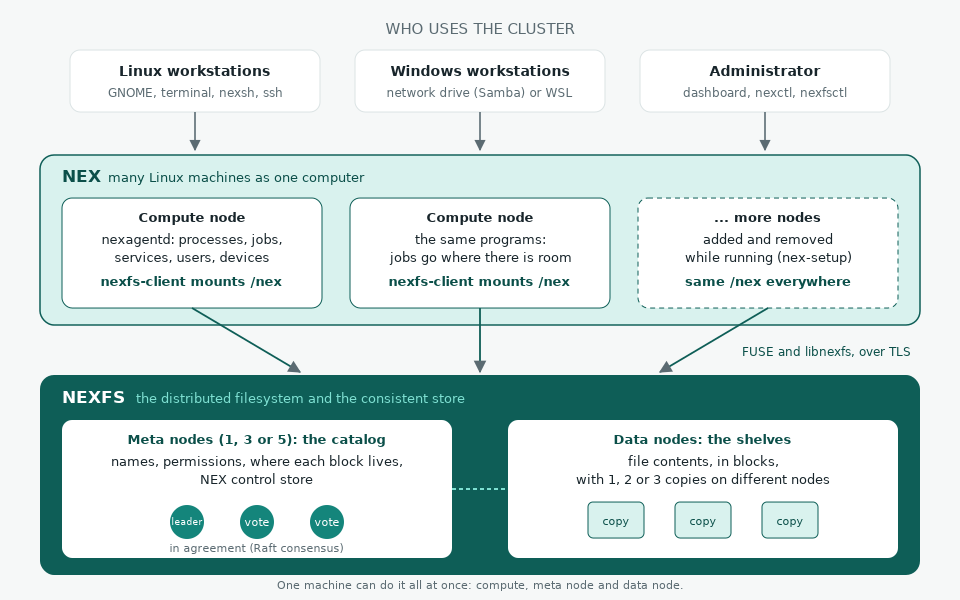
NEXFS is the common filesystem of nex-cluster: a folder seen the same by every machine of the group, with the data copied on several nodes, and the consistent store on which NEX coordinates services, queues and leaders. It is the storage of NEX, and it can also be used on its own, on several Linux machines.
It is a new solution, written from scratch in C on its own library developed independently. Everything in user space, no kernel module: a daemon, a FUSE client, a tool and a library, in a package of less than 400 KB.
Strong on metadata and small files, very light to install and administer. NEXFS creates, finds and deletes files by holding folders under a lease and answering from the memory of the node, carries small files together with their metadata in a single exchange, and
fsyncreturns only when the data is on the disk of every copy.
Who it is for
- nex-cluster users: NEXFS is the common folder
/nexof every node and the consistent store on which NEX coordinates services, queues and leaders. - Anyone with several Linux machines who wants a common folder, with the data in several copies on different nodes, starting from a single machine.
- Development and computing teams: builds with
makeand a sharedccache, podman container images, theaptcache, used as on a local disk. - Offices with Windows workstations: project folders and homes appear in File Explorer through an SMB share (Samba), and developers also mount them from WSL.
What it does
A real POSIX filesystem
Programs use it like a local disk, without changes (tested: builds with
make and a shared ccache, rsync -aH, podman container images, the
apt cache, Samba). On NEXFS these work, the same from every node:
- permissions, owners and groups, POSIX ACLs and extended attributes, checked by the servers and not only by the client;
- hard and symbolic links, FIFOs and sockets, atomic
renamealso across folders,O_EXCL,O_TMPFILE,RENAME_WHITEOUT(overlayfs on top of NEXFS); flock, POSIX and OFD locks across the nodes, withF_SETLKWthat waits;O_APPENDfrom several nodes on the same file,mmapalso shared for writing, sparse files,fallocate,copy_file_range;- a file deleted while open can still be used, even if another node deleted it;
chattr +iand+a, creation time (statx),fsyncof folders.
Verified with the test suites used by the developers of the Linux filesystems:
| Suite | Result |
|---|---|
| pjdfstest | 8,798 cases in 238 files: all passed |
xfstests, quick group |
188 tests passed, none failed |
| fsx and fsstress | one hour on two nodes together, no difference and no error |
Grows while running, from one node to many
You start with a single machine and grow without reinstalling and without stopping anything, while programs are working:
- more space: one more data node with one command (
nexfsctl node add): new blocks use it after a few seconds, and the rebalancing moves its share of the existing ones to it in the background, at a limited speed; - more disks on a node: up to 16 per data node, also of different sizes, each in its own folder; the blocks are spread over the disks, and if one breaks the node goes on with the others while the copies of its blocks are rebuilt from another node; the new disk mounted in its place is used by itself, while running;
- more copies: with three data nodes the group moves to three copies by itself, also for the blocks written before;
- fewer nodes: draining moves the copies to the other nodes (refused if they are not enough), then the node is switched off and removed;
- maintenance: a node stops for a reboot or a new kernel and comes back, without copying again anything that has not changed.
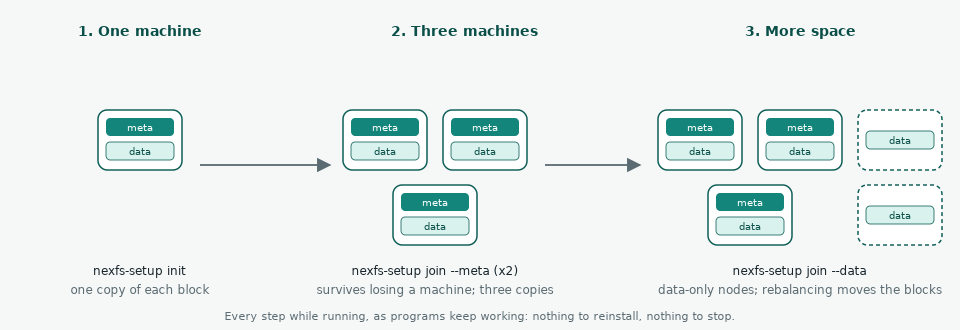
Whoever writes while the group grows or shrinks sees no errors: the tests measure it, with pauses below one second even while a node is drained.
Speed where it matters, safety where it matters
The number of copies is chosen per folder, while running:
nexfsctl copies 3 /home           # real data: three copies
nexfsctl copies 1 /cache          # caches and temporary files: one copy, faster to write
The durability of the metadata is also chosen per folder: grouped (the default, like a local disk) or full, with every operation on the disk of the majority of the meta nodes before returning.
Snapshots and quotas
- Snapshots of any folder with a
mkdirin.snap: instant, with copy-on-write of the blocks, and inside everything as it was, read-only. - Quotas of space and number of files per folder, valid from whichever node writes, and recursive counts (bytes, files, subfolders) always up to date.
A consistent control store
Keys and values, conditional writes, expiring locks with a fencing token,
notifications: it is the control plane of NEX (services, queues, leaders,
secrets), and programs use it through the libnexfs library.
Security
fsyncis a promise kept: the data is on the disk of every copy when it returns, and a confirmation is never taken back.- Mutual TLS 1.3 on every connection, certificates with roles: administrators, admitted data nodes, clients.
- Encryption at rest of the blocks (AES-256-XTS), with the key off the data disks.
- Periodic scrub of every copy and offline check.
- Unprivileged daemons, protocol tested with fuzzing.
- Upgrades without stopping: one node at a time, and the client that restarts without unmounting the filesystem, with open files and locks that stay.
All the details in Security and durability of the data.
How NEXFS is built, in detail, is in the technical area reserved to those who sign in.
Performance in brief
Creating, finding and deleting files is the strongest point of NEXFS: a node working in a folder holds it under a lease and answers from its own memory. Small files travel with their metadata in a single exchange, and the number of copies chosen per folder puts speed where it matters and redundancy where it matters. The details are on the Performance page.
Status
NEXFS is a new solution. Every guarantee written in these pages is verified by lab tests with the real processes, and for failures with machines switched off abruptly: more than 150 tests passed, plus the external suites pjdfstest (8,798 cases), xfstests and one hour of fsx and fsstress on two nodes together.
Documentation
The guides below, and the manual pages of the commands.
| Guide | |
|---|---|
| NEXFS at a glance | what it does, how it is made |
| Glossary | the words of NEX and NEXFS, each in two lines |
| Installation | from the package to a group of three nodes |
| Administration | nodes, disks, copies, maintenance, upgrades |
| Configuration | every key of /etc/nexfs/nexfs.json |
| The client | mounting, folder attributes, quotas, snapshots |
| Windows workstations | SMB shares with Samba, WSL for developers |
| Security and durability of the data | what it guarantees, and how |
| Performance | where it is fast, and why |
NEXFS is the storage of nex-cluster: its overview, guides and performance are in the NEX section of the site.