
NEXFS at a glance
By Roberto Arato of aratoingegneria.it
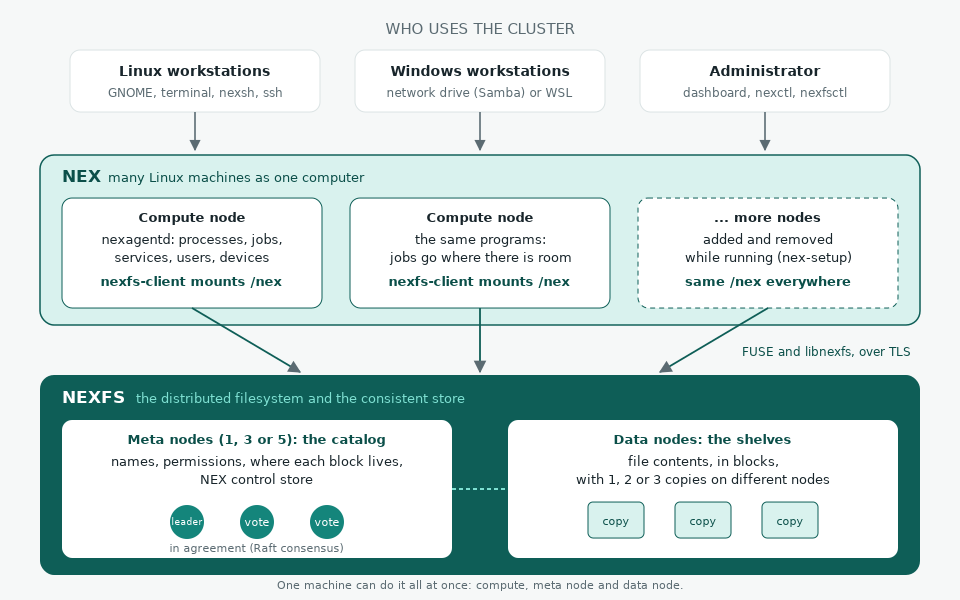
NEXFS is the distributed filesystem of nex-cluster: a single folder shared by every machine in the cluster, with the data copied to several nodes, and a consistent store for whoever coordinates the work. You can use it with NEX, where it takes the place of Ceph, or on its own, across several Linux machines.
It is a new solution, written from scratch in C on top of an in-house library: everything runs in user space, no kernel module.
What it does
- A true POSIX filesystem, shared by all nodes. You mount it like any
other folder (
/nexin NEX) and programs use it unchanged: permissions, ACLs and extended attributes, links, atomicrename,flock, POSIX and OFD locks across nodes,O_APPENDfrom several nodes,mmap, sparse files,O_TMPFILE, overlayfs on top. Verified with the Linux filesystem test suites: pjdfstest (8,798 cases, all passed), xfstests (quickgroup: 188 tests passed, none failed), one hour of fsx and fsstress on two nodes at once. - It grows while running. You start from a single machine and add data nodes (more space) and disks while programs keep working, with no reinstall and nothing to stop; rebalancing spreads the blocks in the background. Draining and removing a node, or putting it in maintenance, works the same way.
- Data in several copies, on different nodes. A file's data is split into blocks of at most 4 MiB (a block only takes up as much space as its data), each with 1, 2 or 3 copies. The number of copies is chosen per folder: speed where you need it, redundancy where you need it.
- A consistent control store. Keys and values, conditional writes, expiring locks with a token, notifications: it is the control plane of NEX (services, queues, leaders, secrets).
- Snapshots of any folder with a
mkdirin.snap, copy-on-write for blocks, read-only access to the folder as it was. - Quotas on space and number of files per folder, and recursive counts that are always up to date.
Why it is different
| NEXFS | |
|---|---|
| Durability | fsync returns only when the data is on the disk of all copies |
| Failures | a client that disappears loses its rights by itself within 15 seconds: nobody stays blocked, no manual eviction |
| Footprint | a package of a few hundred KB: one daemon, one client, one tool, one library |
| Startup | the first node is created with one command in a few seconds; you grow from one node to many without reinstalling |
| Operations | rolling upgrades one node at a time, rollback to the previous version, client restart without unmounting |
| Security | TLS everywhere with certificates and roles, encryption at rest, periodic scrub, offline check |
| Metadata | creates, stat and deletes are the strongest point: folders under lease are answered from the memory of the node |
How it grows
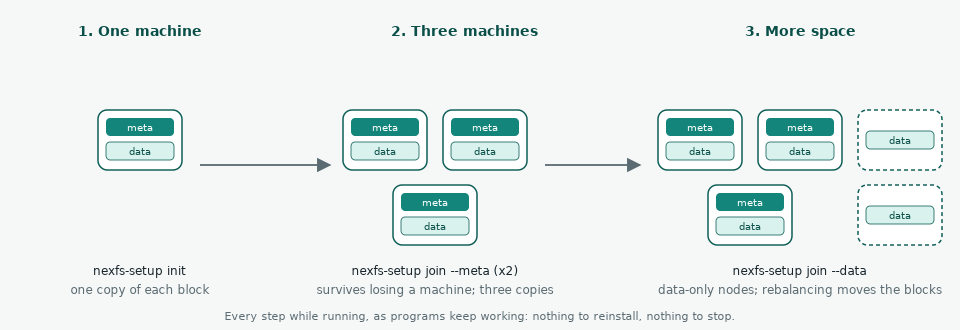
How NEXFS is built, program by program, is in the technical area reserved to those who sign in.
The guides
| Guide | For whom |
|---|---|
| Glossary | the words of NEX and NEXFS, each in two lines |
| Tutorial | three clean machines to a working cluster in half an hour, step by step, without NEX |
| Installation | from the package to a three-node cluster, mounting on the clients |
| Administration | nodes, disks, copies, maintenance, upgrades, checks |
| Configuration | every key of /etc/nexfs/nexfs.json |
| The client | mounting, options, folder attributes, snapshots, quotas |
| Windows workstations | SMB shares with Samba (and with NEX), WSL for developers |
| Security and data durability | what NEXFS guarantees and how |
| Performance | where it is fast, and why |
| Command reference | every nexfsctl command, with an example and its answer |