
Installation
By Roberto Arato of aratoingegneria.it
This guide takes you from clean Linux machines to a NEXFS cluster of three
machines, each one a meta node and a data node (the cluster survives the loss
of any one machine), plus a client that mounts the filesystem: one command
per machine, with nexfs-setup. With NEX you don't need this: nex-setup
does it, with certificates from the NEX CA.
In the example:
| Machine | Address | What it does |
|---|---|---|
node-1 |
10.20.0.11 | meta node and data node (the first one) |
node-2 |
10.20.0.12 | meta node and data node |
node-3 |
10.20.0.13 | meta node and data node |
compute-7 |
10.20.0.27 | client: mounts the filesystem |
What you need
- 64-bit Linux with FUSE (every distribution has it); tested on Debian 13 and on Ubuntu 24.04 and 26.04 LTS. With a kernel from 6.16 up, the client keeps folder names cached longer; with an older one it works the same way, with a little more traffic towards the client.
- A network between the machines: TCP ports 7400 (the nodes) and 7401 (the join channel of the meta nodes) open between all nodes and from the clients to the nodes.
- On data nodes, one disk (or more) for the blocks, mounted on a folder
(for example
/srv/nexfs/disk0), with ext4 or XFS. Without one, the blocks go to/var/lib/nexfs/disco0. - The machines' clocks do not need to be synchronized for data consistency (NTP is still a good idea, to read the logs).
1. The packages, on every machine
sudo apt install ./nexfs*_0.9.11_amd64.deb ./libnexfs0_0.9.11_amd64.deb
From the NEX APT repository, sudo apt install nexfs is enough. From 0.9.10
NEXFS comes in separate packages, and nexfs is the one that brings them all
(except the development one): in this guide every machine is a node and a
client, and you install nexfs.
| Package | What it contains | Where it is needed |
|---|---|---|
nexfs |
nothing: it brings the four below, of the same version | the simple choice, everywhere |
nexfs-server |
nexfsd, its systemd unit, the nexfs system user the daemon runs as, the example /etc/nexfs/nexfs.json.esempio |
meta and data nodes |
nexfs-client |
nexfs-client, mount.nexfs (for mount -t nexfs and /etc/fstab), the nexfs-client@ unit |
where the filesystem is mounted |
nexfs-tools |
nexfsctl, nexfs-setup |
everywhere: they configure the machine |
libnexfs0 |
the libnexfs library |
programs that use it (the NEX agent) |
libnexfs-dev |
nexfs.h, libnexfs.so, nexfs.pc (pkg-config) |
only to compile with the library |
A machine that is only a client can have just nexfs-client and
nexfs-tools. The service does not start by itself: nexfs-setup starts it
once the node is configured. From a version up to 0.9.9, which was a single
package, you upgrade with the same command: configuration and data stay and
nexfsd restarts with the new program.
2. The first machine
On node-1:
sudo nexfs-setup init --disk /srv/nexfs/disk0
The cluster is ready: node node-1 at 10.20.0.11, in 3 seconds.

Entry code (roles data,meta,client, 5 uses, valid 60 minutes):

    Y8TJ-CEBS-52HD-12FJ-011S-N1QJ-XZBK-M602

On each new machine:

    nexfs-setup join 10.20.0.11 Y8TJ-CEBS-... --data
    nexfs-setup join 10.20.0.11 Y8TJ-CEBS-... --meta --disk /var/lib/nexfs/disco0
    nexfs-setup join 10.20.0.11 Y8TJ-CEBS-... --client --mount /nex
In three seconds the cluster exists: the CA (in /etc/nexfs/pki/, with
the key readable by root only), the node certificate, the configuration, the
service, the filesystem. The node name is the machine's name and the address
is the one of its default route; you can choose them with --node and
--address.
The entry code is how the other machines join: it is valid for the time and the number of uses shown (here one hour and five machines). You can create more codes on a meta node whenever you need them:
sudo nexfs-setup token --role data --uses 3 --ttl 30   # three data nodes within half an hour
sudo nexfs-setup token list                            # the codes, the uses left, the expiry
sudo nexfs-setup token revoke 1234567                  # a code withdrawn before it expires
3. The other two nodes
On node-2 and on node-3:
sudo nexfs-setup join 10.20.0.11 Y8TJ-CEBS-52HD-12FJ-011S-N1QJ-XZBK-M602 --meta --disk /srv/nexfs/disk0
This machine joined the cluster as a meta node: node-2, id 2, in 6 seconds.
What happens, in six seconds:
- the machine's key is generated on the machine and never leaves it;
- the machine talks to the join channel of
node-1(port 7401): the two sides prove to each other that they know the code, without sending it over the network, so the machine receives the cluster's real CA and nobody can get in the middle; node-1signs the certificate request, picks the node number and admits it to the cluster; to a meta node it also gives the CA key, so that it can welcome new machines in turn;- the machine joins the meta node group (it receives the filesystem index
and, once it has caught up, votes) and, with
--disk, also acts as a data node.
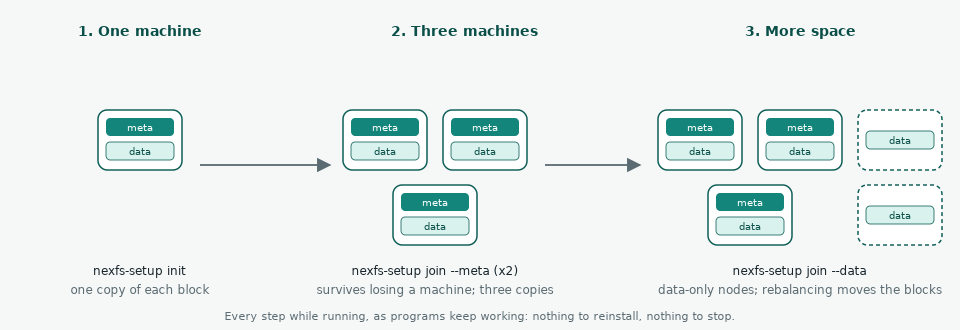
With three meta nodes the cluster survives the loss of one; with three data nodes new blocks are created with three copies, and the existing ones are brought up to three in the background.
nexfsctl meta list
{"members": [{"id": 1, "name": "node-1", ..., "voting": true}, {"id": 2, ...}, {"id": 3, ...}]}
nexfsctl space
{"total": 5998..., "free": 5990..., "inodes": 1, "copies": 3, "converting": false}
Later, for more space, you add data-only nodes, again while running:
sudo nexfs-setup join 10.20.0.11 CODE --data --disk /srv/nexfs/disk0 --disk /srv/nexfs/disk1
4. The client
On compute-7:
sudo nexfs-setup join 10.20.0.11 Y8TJ-CEBS-52HD-12FJ-011S-N1QJ-XZBK-M602 --client --mount /nex
This machine is a client of the cluster: /nex is mounted, in 2 seconds.
The client receives its certificate and the cluster's meta nodes, and the
filesystem is mounted by the nexfs-client@nex.service unit: it comes back up
by itself at boot and is upgraded without unmounting (see
The client).
df -h /nex
5. Checking
nexfsctl health
{"status": "ok", "reasons": [], "quorum": true, "leader": 1, "meta_nodes": 3, "meta_nodes_up": 3, "data_nodes": 3, "data_nodes_up": 3, "blocks_degraded": 0, ...}
"status": "ok" means that all nodes respond and every block has all its
copies.
By hand, without codes
nexfs-setup uses nexfsctl commands, which you can also run directly, for
example with certificates from a CA you already have: nexfsctl init on the
first machine, nexfsctl node allow NAME to admit a node, then
nexfsctl meta add or node add on the new machine, with a copy of a node's
configuration (--like) and its certificates. The options are in the
nexfsctl(8) manual page and in the Administration
guide.
From here on: Administration to grow the cluster, put a node in maintenance, upgrade.